
Aurum theme and the look
The Theme (AFMTheme) is the single source of truth for the look. Every widget reads from the active theme, so one asset re-skins every screen and HUD piece.
| Group | Properties |
|---|---|
| Palette | Background top and bottom (gradient), screen dim (behind dialogs), game dim (over the game behind the pause menu), page dim (over the scene behind pages), panel (tints the generated stone), panel outline, accent (gold), ember (warm light), accent contrast, text primary / secondary / muted, danger, button normal / hovered / pressed / disabled, row normal / focused, slider track, separator, key fill / outline / text |
| Palette, Parchment | Parchment (paper colour), Ink (text on parchment), Rubric (headings and initials on parchment, like red manuscript lettering) |
| Typography | Title, heading, subheading, body, button, caption and small print (Data) fonts. Uppercase titles, uppercase buttons, title shadow colour and offset |
| Shape | Corner radius, outline width, accent bar width, cut size, filigree size (the corner scrolls of large panels), inner rule inset, show kickers (the small capitals over titles), slider ticks |
| Layout | Screen padding, Main Menu Alignment, menu button width, height and spacing, button content padding, secondary button height, pause menu width, dialog width, setting row height, settings description width |
| Background | Background brush, main menu background opacity, pause blur, pause desaturation, page blur, grain and grain speed, glow, vignette, burn edges |
| Atmosphere | Backdrop layers, vista layers, sky (stars, moon, god rays, clouds, horizon glow), parallax amount, fog, embers, dust, flicker, menu scrim |
| Effects | Title gradient, title reveal time, title gleam interval |
| HUD | Subtitle font, subtitle max width, HUD margin, notification width (the minimum) |
| Chapters | Chapter still width, locked chapter dim, lock icon (the Strip layout) |
| Motion | Screen fade in time, screen slide offset, hover transition speed, credits scroll speed |
| Sounds | Hover, click, back, screen open, tab, change and locked sounds |
| Presets | Preset To Apply and the Apply Selected Preset button |
The five presets
Section titled “The five presets”| Preset | Look |
|---|---|
| Aurum (the default) | Gold on deep umber, parchment and ember light. |
| Frost | Silver on slate blue under a cold moon. |
| Verdant | Bronze on forest green. |
| Blood Moon | Crimson on black under a red moon. |
| Ivory | Ink on light parchment: a light theme. |
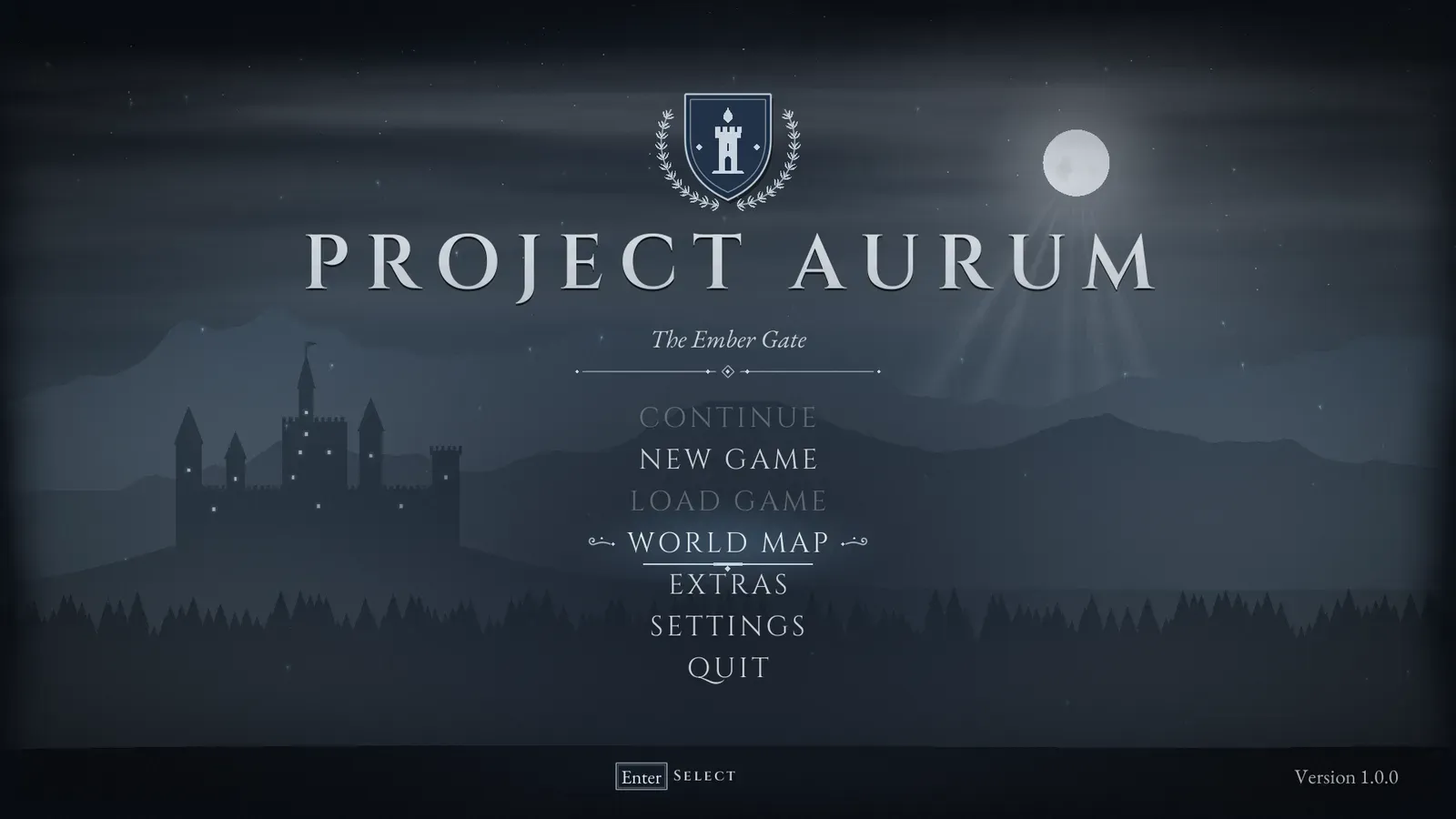
Frost.
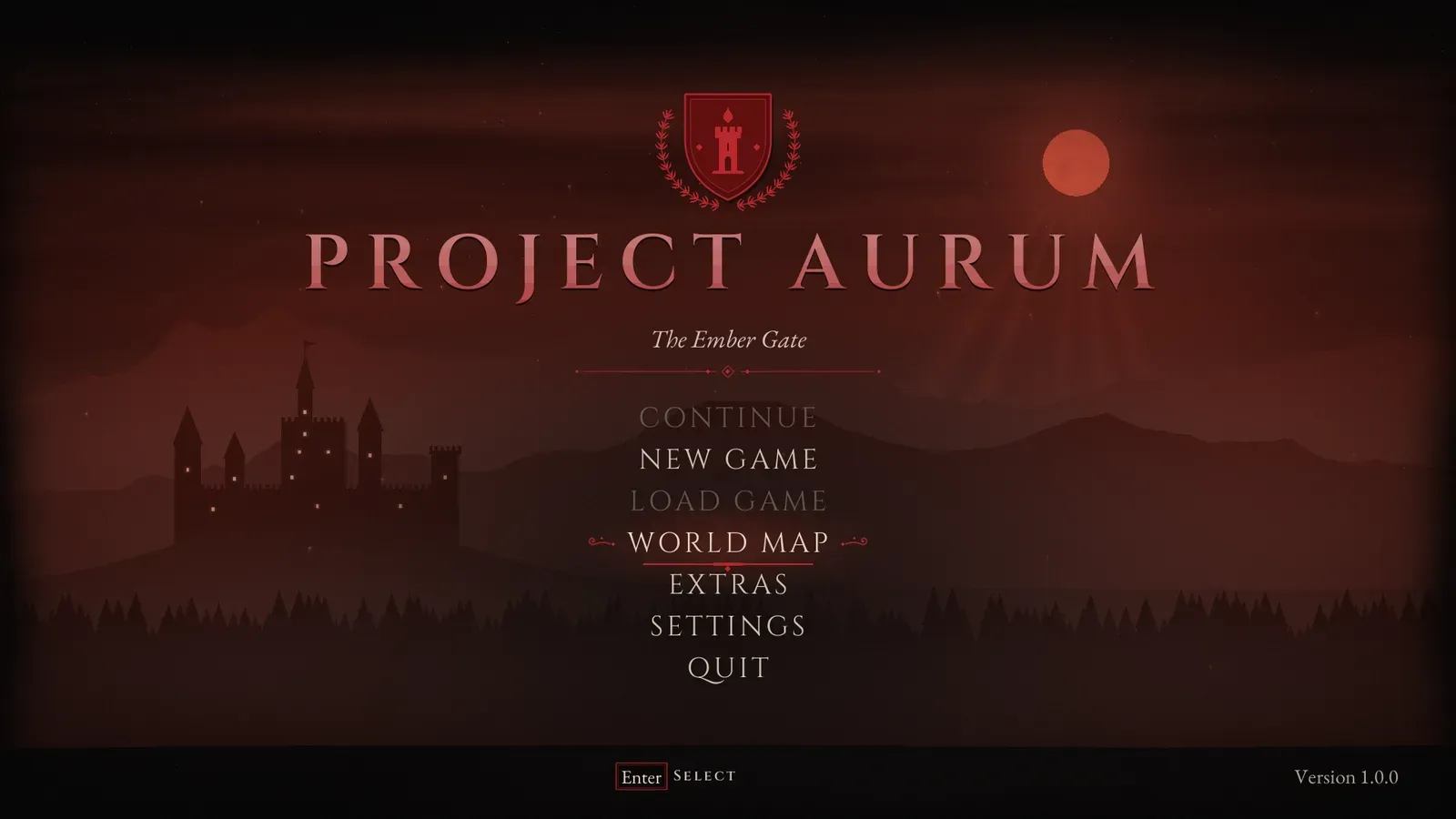
Blood Moon.
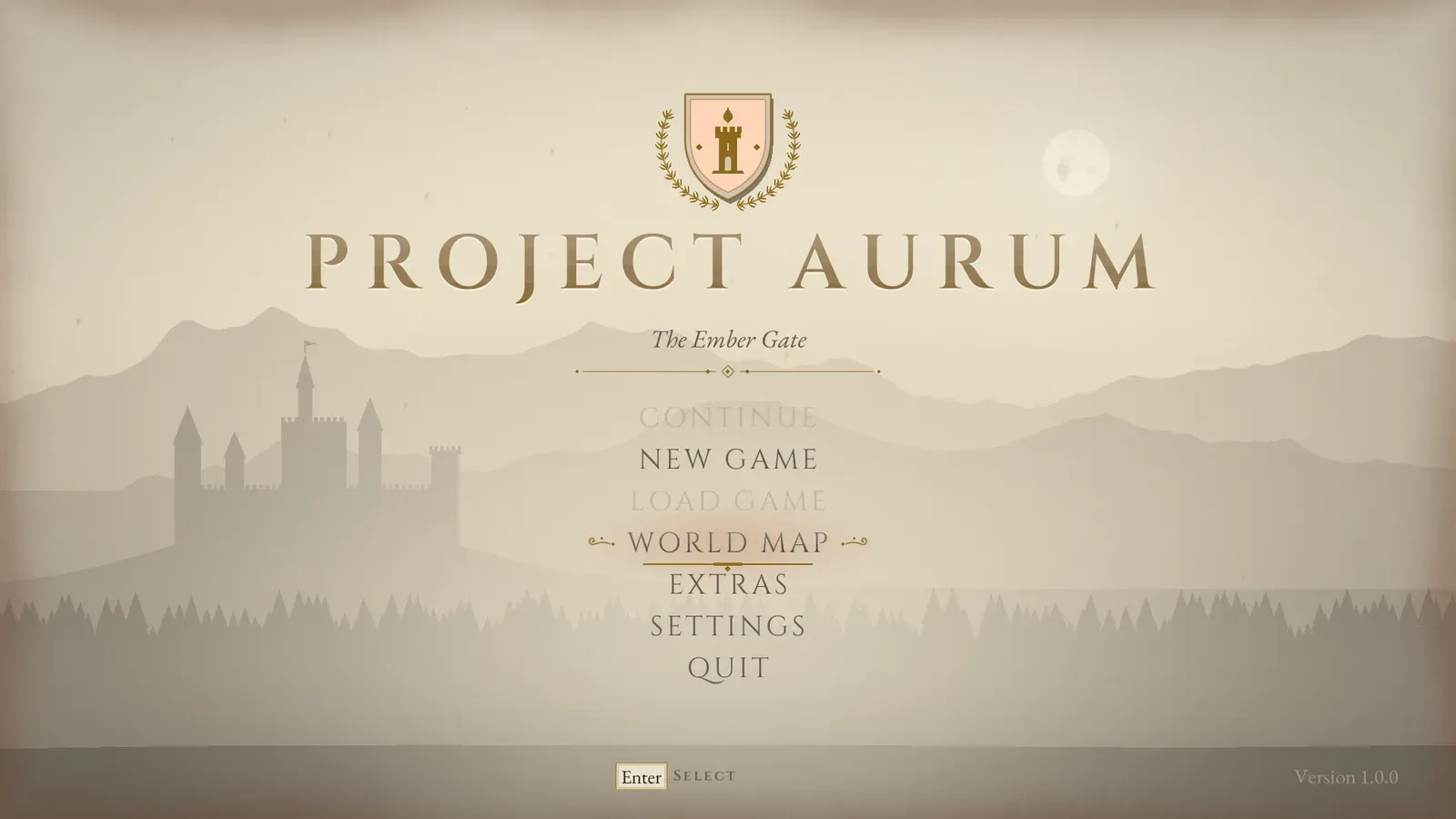
Ivory, the light one.
- A preset overwrites the palette, the atmosphere’s colours (vista, moon, clouds, fog, embers, scrim, burnt edges) and the letter spacing. Fonts, sizes and layer textures are kept. Apply Preset does the same from Blueprint.
- The padlock and every frame, icon, rule and gauge are white or drawn in code, tinted by the theme, so they follow every preset.
Working with themes
Section titled “Working with themes”- Editing the theme while playing in the editor restyles open menus live.
- Set Runtime Theme swaps the theme in game, for example from a “UI style” option. Pass None to go back to the project setting.
- The default fonts are Cinzel (
F_AFM_Cinzel: Regular, SemiBold and Bold) for titles, entries and labels, and EB Garamond (F_AFM_EBGaramond: Regular, Medium, SemiBold and Italic) for text, subtitles and small print. Both cover Latin; Cyrillic falls back to the engine’s Roboto, and Japanese, Korean and Chinese to the engine’s Droid Sans Fallback. - Both fonts are licensed under the SIL Open Font License 1.1, which allows them in commercial games. The licence texts are in
Content/Fonts/Cinzel-OFL.txtandContent/Fonts/EBGaramond-OFL.txt: ship them with your game’s other third party notices.
Interface sounds
Section titled “Interface sounds”Seven interface sounds ship with the plugin, in Content/Sounds (plucked strings, a bell, a page rustle), and every theme sets them by default:
| Sound | When it plays |
|---|---|
| Hover | Focus moves |
| Click | An item is picked |
| Back | The player goes back |
| Open | A screen or dialog opens |
| Tab | A tab changes, or the chapter select moves to another chapter |
| Change | A setting’s value changes |
| Locked | A locked chapter is picked |
- Pick your own sounds, or clear a slot for silence. Ambient menu music is not part of the plugin.
- The sounds play at the Interface volume setting. If your sounds use the Interface sound class from the Menu Config, the settings’ sound mix scales them instead.
- One action plays one sound. Call Play UI Sound to play a theme sound from your own widgets.
The look: plates, parchment and titles
Section titled “The look: plates, parchment and titles”- Frames (
AFMFrame): a Border drawn as an ornate plate: a Solid, Parchment or Stone surface, generated at runtime and tinted, an outline with a second inner rule, filigree scrolls in the corners, a small diamond on the top edge and edges darkened like worn paper. Focused items add a gold underline drawn out from the centre, scrolls either side and a soft light behind. Panels, dialogs, entries, plaques and the HUD pieces use it. Use it in your own layouts, in the Assetpro Fantasy Menu section of the widget palette: set its Frame Style, and call Play Reveal to fade it in while its filigree unrolls. - Titles (
AFMTitleText): a Text block whose letters shade from light to dark like gilding (Title Gradient). Play Intro spreads the ink across it from the left with a ragged, soaking edge (Title Reveal Time), and Play Gleam sweeps a slow light across it. Screens play the intro for their titles when they open, and the main menu’s title gleams every few seconds. Shrink To Fit draws a long title, or a long translation, smaller instead of cutting it off. - Illuminated text (
AFMIlluminatedText): a paragraph set like a manuscript page, its first letter a large gold initial in a double gold frame on a red field, the first lines wrapping beside it. Codex pages, letters, the journal and class descriptions use it. - Decor, all drawn in code:
AFMRule(the divider with a diamond at its centre),AFMValueBar(a gold rule filled to a value, with ticks and a diamond knob),AFMSpinner(the saving ring),AFMIconWidget(the notification icons),AFMCrest(the main menu’s crest),AFMPortrait(the save cards’ medallion),AFMBook(the pause tome’s cover, gutter and turning leaf),AFMWorldMap, and the HUD’sAFMBossGauge,AFMCompassStripandAFMRibbon. - Kickers: small gold capitals over screen titles naming the section (“ACCESSIBILITY”, “CHAPTER III”). Turn them off with the theme’s Show Kickers, or set a screen’s Kicker to your own text.
- Reduce Effects (Settings > Accessibility) turns off inked-in titles, gleams, page turns, flickering light and unrolling banners everywhere and keeps a third of the embers; screens simply fade in. Brightness dips never play more than three times a second anywhere in the interface, whatever the settings.
The atmosphere
Section titled “The atmosphere”AFMAtmosphere draws the living background behind every menu, all in code: no textures from your project, no materials and no render targets. From back to front: the theme’s gradient and glow, stars, the moon and its halo, god rays, drifting cloud bands, a warm glow on the horizon that flickers like candlelight, the Vista Layers with mist banks between them, your backdrop layers if any, two bands of fog, specks of dust, rising embers with glowing trails, a pool of shade behind the menu, a vignette, burnt page edges and film grain. The scene sways slowly and moves with the mouse, and keeps moving while the game is paused.
| Theme property | What it does |
|---|---|
| Vista Layers | The landscape, far to near (the table below). Empty draws no vista. |
| Star Count | Stars in the upper sky, in the moon’s colour. 0 turns them off. |
| Moon Color, Moon Position, Moon Size | The moon and its halo. Alpha 0 hides the moon and its god rays. |
| God Rays | Strength of the shafts of light falling from the moon. 0 turns them off. |
| Cloud Color, Cloud Speed | Cloud bands drifting across the sky. Alpha sets their strength. |
| Horizon Glow, Horizon Height | Warm light low over the horizon, like fires beyond the hills. |
| Parallax Amount | How far (pixels at 1080p) the nearest layer moves with the mouse. 0 keeps the scene still. |
| Fog Color, Fog Speed | Drifting fog and the mist between the vista’s layers. Alpha sets its strength. |
| Ember Count, Ember Color, Ember Speed | Embers rising from below. 0 turns them off. |
| Dust Count, Dust Color | Specks of dust hanging in the light. 0 turns them off. |
| Flicker | How much the warm light (horizon glow, embers, lit windows) wavers. 0 keeps it steady, and Reduce Effects does too. |
| Menu Scrim | Shade behind the menu: a pool low in the middle behind centred menus, or from the side the menu sits on. A light colour brightens instead, for light themes. |
| Background Grain, Grain Speed | Film grain. Grain Speed is how many times a second it changes (24); 0 keeps it still. |
| Background Glow, Background Vignette, Burn Edges | The soft light in the upper right, the darkening towards the edges, and a ragged burnt darkening round the frame like an old page. |
| Page Blur, Page Dim | How far the scene steps back, out of focus and darker, behind settings pages, the controller layout, the credits and the chapter select. |
| Backdrop Layers | Your own picture layers (white shapes with transparency, drawn in their Color; Depth, Drift Speed, In Front Of Fog), in front of the vista. Empty by default. |
| Vista layer field | What it does |
|---|---|
| Kind | Mountains (jagged peaks), Hills (soft rolling hills), Castle (a hill with a castle of towers and lit windows) or Forest (a line of pines). |
| Color | The silhouette’s colour. Far layers are usually lighter: they sit deeper in the haze. Presets recolour it. |
| Window Color | The castle’s lit windows; alpha sets their brightness. Castles only. |
| Depth | How much the layer moves with the mouse: 0 stays still, 1 moves the most. |
| Base | Height of the layer’s foot, as a share of the screen height from the top. |
| Height | Height of the peaks, hills, castle hill or trees, in pixels at 1080p. |
| Position, Size | Castles: where the castle stands across the screen (0 left, 1 right) and its size (1 is about 240 pixels tall at 1080p). |
| Seed | Changes the shapes. The same seed always gives the same landscape. |
The default vista is two ranges of mountains, the castle on its hill (on the left, Position 0.22), a forest line and near hills. The ridges repeat sideways, so the vista fills any screen width.
- Key art instead: Menu Config > Main Menu Background Image replaces the scene with one picture, scaled to cover the screen. The fog, dust, grain and vignette still go over it. Keep the side under the menu calm.
- A 3D level behind the main menu: lower Main Menu Background Opacity. The gradient and layers fade; the fog, dust, grain and vignette stay.
- Behind the pause menu the atmosphere draws no scene: its fog, dust, grain and vignette go over the blurred game.
- The atmosphere is a widget of its own (
AFMAtmosphere, in the Assetpro Fantasy Menu section of the widget palette): add it to your own screens for the same background.